---
title: "DATA PROCESSING"
authors: "Marco D'Agostino, Théo Degand, Lei Ding"
toc: true
format:
html:
output-file: "index.html"
html-math-method: mathjax
code-fold: true
# code-summary: "Show code"
code-tools: true
code-overflow: wrap
self-contained: false
theme: zephyr
editor: source
---
## INTRODUCTION & SET UP
This notebook presents simple codes to load, process and clean time-series data about leaf water potential ( $LWP$ ) , soil water potential ($SWP$) and weight ($W$) for transpiration rate ($T_r$).
The repository contains the following folders :
- **data/** :
- **raw/** contains one folder per variable. Inside each subfolder are stored raw files directly collected from sensors. Typically, each file corresponds to one plant.
- **clean/** contains cleaned tables (in .csv format) for metadata and for each variable.
- **plots/** : contains plots and figures generated by this notebook.
- **src/** contains custom functions used to process, compile and clean the raw data:
- *Data_Preparation.R* contains functions to clean weight and Leaf Water Potential :
- *load_LWP()* : Load all CSV files from psychrometers in the input folder into a single dataframe. By default it loads "Date", "Time","Chambertemp", "dT", "WetBulb", "LWP", "Intercept", "Slope", "Correction_dT", "Correctionfactor", "BatteryLevel" columns.
- *load_psy_file()* : Simple function to load and format one CSV psychrometer file. This function is used in a loop in *load_LWP()*
- *load_SWP()* : Loads all .data files present in the input folder into a single dataframe with "DateTime", "Teros_ID" and "SWP" columns.
- *load_Weight()* : Loads all .csv files from weight scales present in input folder into one dataframe with "DateTime", "Scale" (weighting scale ID) and "Weight".
- *compute_Tr()* : computes transpiration rate from weight data, following : $T_r(t) = \frac{W(t) - W(t-1)}{\Delta t}$
- *process_hourly()* : summarize a dataframe into Mean, SD, Median and Mad by grouping per givein variables.
- *load_csv_custom()* : custom function to load pre-processed csv files to correctly format DateTime column in POSIXct format.
- *clean.weight()* : takes pre-loaded weight data, detect refilling times, cut and paste data to have weight values only relative to evapo-tranpsiration.
- *clean.LWP()* : applies the cleaning algorithm to pre-loaded LWP data.
- *LWP_algorithm.R* contains codes for cleaning LWP data. The main function to use is *clean.LWP()*.
- *Custom_Plots.R* contains codes for custom plots :
- *plot_timeseries()* is a custom plot function to show timeseries data with day and night patterns represented by grey and white rectangles in background.
- *plot_destructive()* is a custom plot function to construct beautifull boxplots for many data.
NB : We included a custom-function to plot timeseries, and show day-night period with grey rectangles. Go in src/Plot_Timeseries.R for details.
### Loading libraries and defining paths
```{r, results='hide', message=FALSE, warning=FALSE}
# rm(list=ls())                                               # clean workspace [comment when Rendering]
# setwd(dirname(rstudioapi::getActiveDocumentContext()$path)) # Set working directory to the current file [comment when Rendering]

# LOAD LIBRARIES
library(SciViews)
library(ggplot2)
library(pander)
library(dplyr)
library(tidyverse)
library(data.table)
library(anytime)
library(ggthemes)

# LOAD UTILITARY FUNCTIONS IN SRC FOLDER
function_path <- "./R/"
for(i in list.files(function_path, pattern = ".R")){
  print(i)
  source(paste0(function_path, i))
}

# SET DIRECTORIES
data_path_clean <- paste0("data/clean/") # Set path to Clean folder
data_path_raw   <- paste0("data/raw/")   # Set path to row folder
plot_path       <- paste0("plots/")      # Set path to plot folder

path_LWP        <- paste0(data_path_raw, "LWP/")
path_SWP        <- paste0(data_path_raw, "SWP/")
path_weight     <- paste0(data_path_raw, "weight/")
```
```{r,}
# OPTIONAL : define a custom theme
my_theme <- theme_classic() +
  theme(
    text            = element_text(size = 11),
    axis.title      = element_text(size = 12),
    axis.text       = element_text(size = 11),
    axis.text.x     = element_text(size = 8, angle = 90, hjust = 1, vjust = 0.5),
    plot.title      = element_text(size = 12, hjust = 0.5),
    strip.background = element_rect(colour = "white", fill = "white"),
    strip.text = element_text(size = 12), # Increase size and make bold
  )
```
### Load Metadata
Load metadata about the experiment.
Here we designed a simple experiment as example :
- 4 plants (`Plant_ID` column)
- 2 different treatments (`Treatment` column) :
- well watered (*WW*)
- water deficit (*WD* )
- Leaf water potential ($LWP$) was recorded with psychrometers (`PSY` column). Raw files are stored in `data/raw/LWP/`.
- Soil water potential ($SWP$) was recorded with TEROS 21 (`Teros` column). Raw files are stored in `data/raw/SWP/`.
- Weight ($W$) was recorded with scales (`Scale` column). Raw files are stored in `data/raw/weight/`.
```{r}
Plants_ID <- read.csv(paste0(data_path_clean, "Plants_ID.csv"))
pander(Plants_ID)
```
## 1) LOAD LEAF WATER POTENTIAL DATA
### Extract from raw files
$LWP$ data from psychrometers are stored in separated `.csv` files.
We use the custom function `load_LWP()` to load and process each csv file in the provided path.
The result is a single table containing Date, Time, LWP value and the ID of plants.
By default, the function also load columns :
- *Chambertemp* : Temperature inside the chamber \[°C\]
- *dT* : the difference of temperature between the 2 thermocouples \[°C\]
- *WetBulb* : the wet bulb (see PSY1-LEAF manual (ICT) for formal definition)
- *LWP* : the Leaf Water Potential measure \[MPa\]
- *Intercept* : Intercept of the calibration curve.
- *Slope* : Slope of the calibration curve.
- *Correction_dT* : Correction factor for dT
- *Correctionfactor* : Correction factor
- *BatteryLevel* : The level of battery
NB: By default, the psychrometers are calibrated with Intercept = 1.00 and Slope = -3.80.
The single file is written as `LWP_raw.csv` in the raw folder.
```{r, eval=FALSE}
# Compile all PSY files into one dataframe
LWP_raw <- load_LWP(path = path_LWP) %>%
  na.omit()

# Change the PSY id by Plant_ID
LWP_raw <- left_join(LWP_raw,
                     Plants_ID[c("Plant_ID", "PSY")],
                     by = "PSY")

pander(head(LWP_raw))

ggplot(LWP_raw) +
  geom_line(aes(x = DateTime, y = LWP)) +
  facet_wrap(~Plant_ID) +
  theme_few()

# Write to raw folder
write.csv(x = LWP_raw, file = paste0(data_path_raw, "LWP_raw.csv"), row.names = F)
```
### Load compiled raw file and apply filtering
Once the raw files are compiled, we can simply load the processed csv file.
NB : each time we load the raw *.csv* files, we need to format correctly the DateTime column.
Data must be filtered by :
- Realistic values of Leaf Water Potential ; here \> -2MPa. This is set arbitrary by visualization, and need to be checked for the species and the conditions. In our experience, -2MPa works nice as a filter for outliers in maize and tomato.
- WetBulb \> 0 (PSY1-LEAF manual)
- -1.5 \< dT \< 0.5 (Bourbia et al. 2021)
- Battery level (in case there is issue when charging)
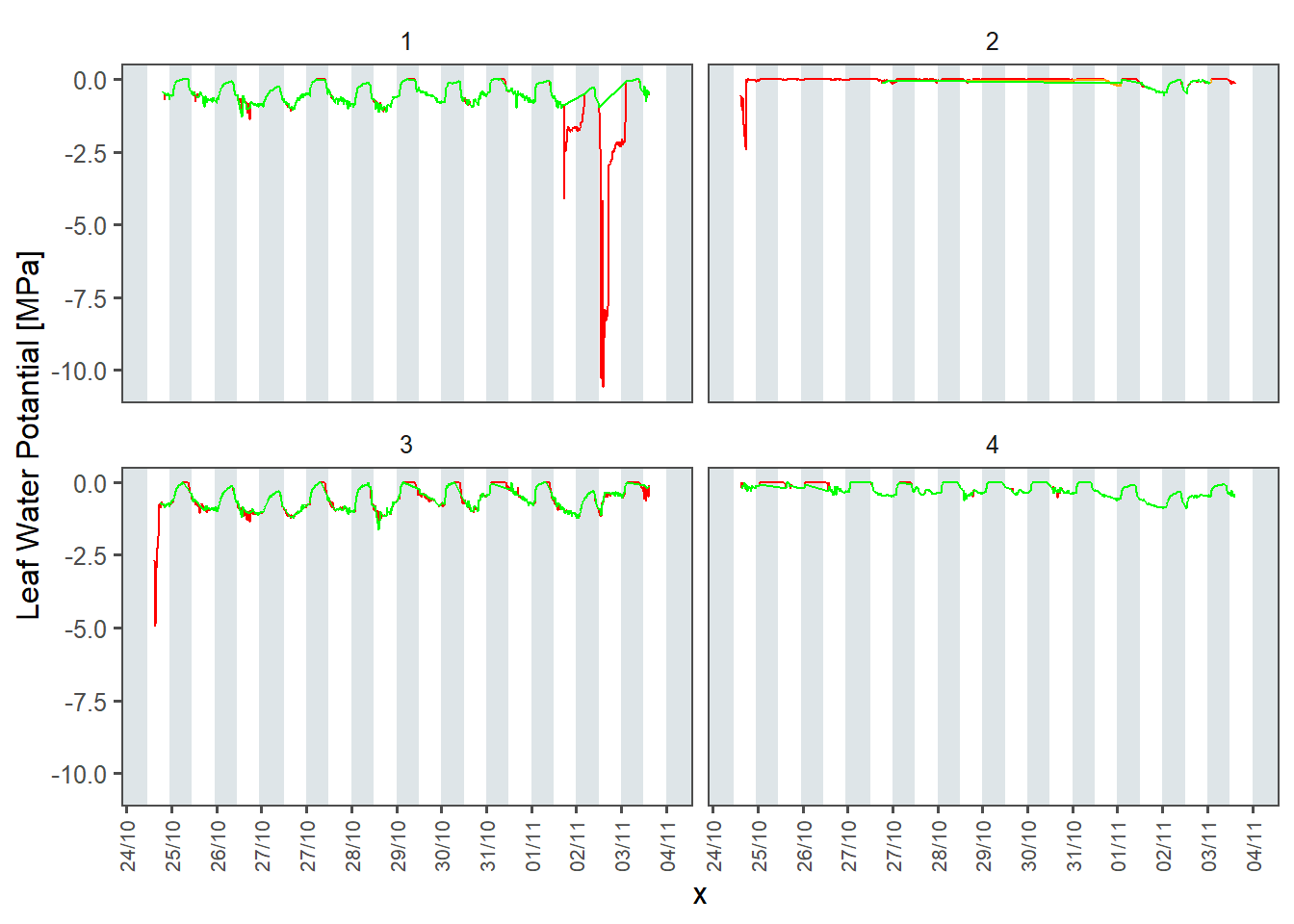
In addition, we developed a LWP cleaning algorithm to get rid of remaining wrong data. It consists of creating buffers per day, and for each buffer we run a bunch of tests to check if we want to keep the buffer of not.
- `check.na` evaluates how many NAN are in the buffer. If there is more NAN than the `nan.th` proportion, the buffer is discarded.
- `check.zero` evaluates how many zeros are in the buffer. If there is more zeros than the `zero.th` proportion, the buffer is discarded.
- `check.cycles` evaluates if LWP at night is lesser than LWP at day. If the mean LWP at day is higher that the mean LWP at night multiplied by `cycle.alpha`, the buffer is discarded.
- `check.slope` evaluates the mean slope of the buffer via a linear model. If the absolute value of the slope is higher than `slope.th`, the buffer is discarded.
- `check.level` evaluates the statistical mean of the buffer compared to the mean of the other buffers. If $\mu_{LWP, i} < \mu_{LWP} - \alpha \cdot \sigma_{LWP}$ or $\mu_{LWP, i} > \mu_{LWP} + \alpha \cdot \sigma_{LWP}$ (with $\mu_{LWP}$ is the mean LWP for all buffers, $\mu_{LWP,i}$ is the mean LWP of the ith buffer, $\alpha$ is the unput multiplicator and $\sigma_{LWP}$ is the standard deviation of LWP), the buffer is discarded.
NB : for the example dataset, data was already good so the application of LWP_algo don't improve the quality.
Finally, the clean dataframe is written to storage.
```{r, message=FALSE, warning=FALSE}
# LOAD RAW LWP
LWP_raw <- load_csv_custom(file = paste0(data_path_raw, "LWP_raw.csv")) %>%
  mutate(Plant_ID = as.factor(Plant_ID))
################################################################################

# CLEANING MANNUALLY
LWP_clean1 <- LWP_raw %>%
  filter(LWP > -2) %>%                # Realistic values
  filter(dT >= -1.5 & dT <= 0.5) %>%  # Filter on dT (Bourbia 2021)
  filter(WetBulb > 0)                 # Filter on WetBulb (PSY1-LEAF manual)

################################################################################

LWP_clean2 <- clean.LWP(LWP_data = LWP_clean1,
                       check.na     = T,
                       check.zero   = T,
                       check.cycles = T,
                       check.slope  = T,
                       check.level  = T,
                       nan.th       = 0.5,
                       zero.th      = 0.5,
                       cycle.alpha  = 0.5,
                       slope.th     = 0.00005,
                       level.alpha  = 2)

################################################################################
p_comp <- plot_timeseries(data = LWP_clean2
                         ,x = "DateTime", y = "LWP"
                         ,color = "Plant_ID"
                         ,show.lines = F
                         ) +
  geom_line(data = LWP_raw, aes(x = DateTime, y = LWP), color = "red") +
  geom_line(data = LWP_clean1, aes(x = DateTime, y = LWP), color = "orange") +
  geom_line(data = LWP_clean2, aes(x = DateTime, y = LWP), color = "green") +
  facet_wrap(~Plant_ID) +
  ylab("Leaf Water Potantial [MPa]")
p_comp
ggsave(filename = paste0(plot_path, "LWP_comparison.png"), plot = p_comp
       ,width = 4, height = 3)
################################################################################

# WRITE TO CLEAN
write.csv(LWP_clean2 %>%
            select(c("DateTime", "Plant_ID", "LWP"))
          ,file = paste0(data_path_clean, "LWP_clean.csv")
          ,row.names = F
          )
```
### Load clean file
```{r, message=FALSE, warning=FALSE}
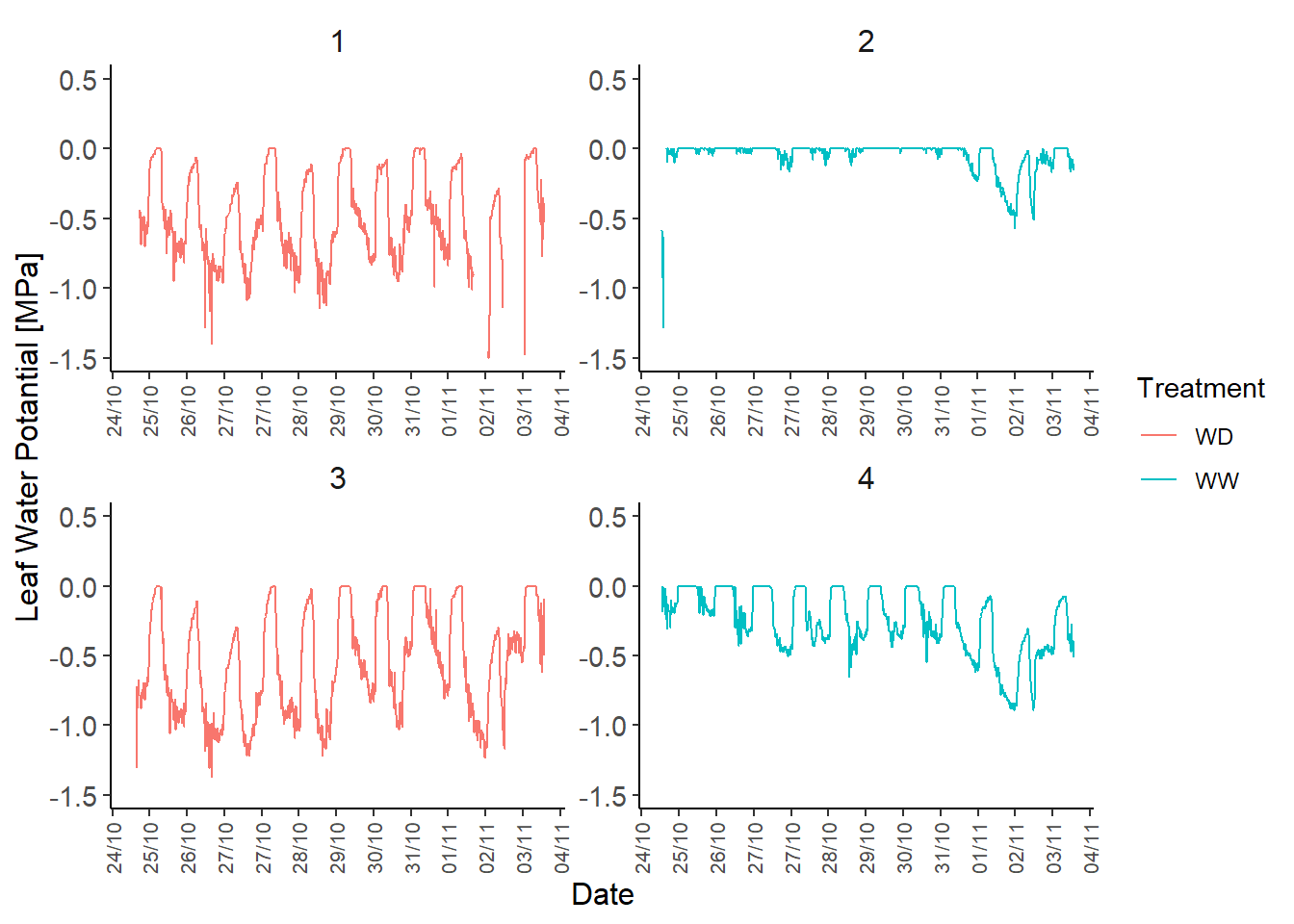
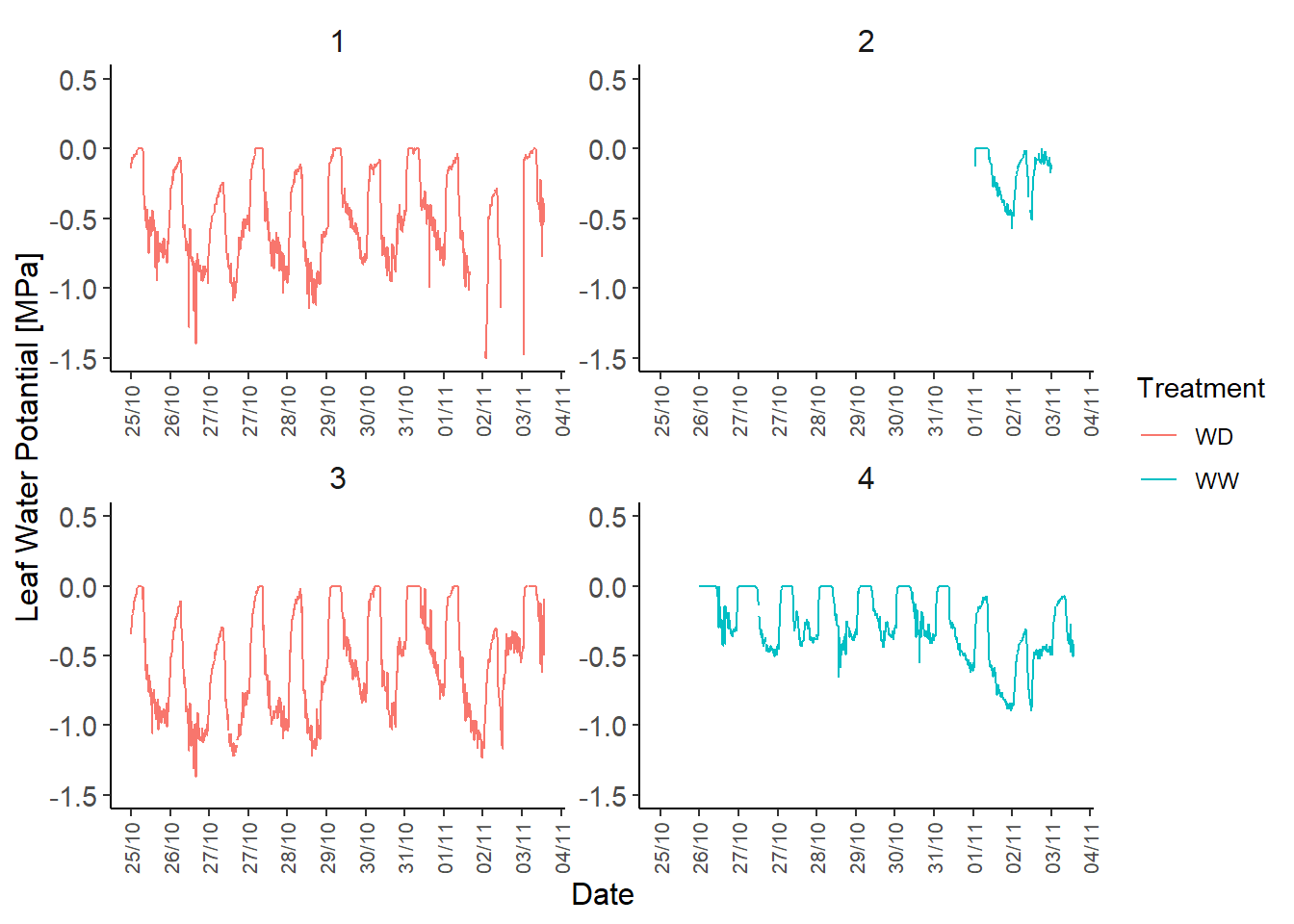
LWP_clean <- read.csv(paste0(data_path_clean, "LWP_clean.csv")) %>%
  mutate(DateTime = anytime(DateTime)) %>%
  mutate(DateTime = as.POSIXct(DateTime, format = "%Y-%m-%d %H:%M:%S")) %>%
  left_join(Plants_ID[c("Plant_ID", "Treatment")])

################################################################################
LWP_plot <- plot_timeseries(data = LWP_clean
                            ,x = "DateTime", y = "LWP"
                            ,color = "Treatment"
                            ) +
  geom_line(aes(x = DateTime, y = LWP, color = Treatment)) +
  geom_point(aes(x = DateTime, y = LWP, color = Treatment)) +
  facet_wrap(~Plant_ID, ncol = 2) +
  ylab("Leaf Water Potantial [MPa]")

# Show plot and save to file
LWP_plot
ggsave(filename = "LWP_clean.png", plot = LWP_plot,
       device = "png", path = plot_path, width = 9, height = 4)
```
## 2) LOAD SOIL WATER POTENTIAL DATA
### Extract from sensor files and compile into a single raw file
SWP data is stored as a unique raw `.DAT` file.\
The function `load_SWP` loads the file and convert it to a tibble.\
The pre-processed file can then be stored in `data/raw/` folder.\
Depending on the format of the `.DAT` file, you may need to change the inputs :\
- `path_SWP` : Path to the folder containing the `.DAT` files. - `sep` : Separator of column. By defaut is space, other used formats are `","`, `";"`.\
- `skip` : Number of lines to skip. By default is zero.\
- `filename` : By default is null and the function scan every file of the folder. If `filename` is specified, the function only loads the corresponding file.
```{r, eval=FALSE, message=FALSE, warning=FALSE}
# Extract from DAT files
SWP_raw <- load_SWP(path_SWP = path_SWP,
                    sep = "\t",
                    skip = 0
                    )

# Replace Teros_ID by Plant_ID and set DateTime as POSIXct
SWP_raw <- left_join(SWP_raw, Plants_ID[c("Plant_ID", "Teros")], by = c("Teros_ID" = "Teros")) %>%
    select(c("DateTime", "SWP", "Plant_ID")) %>%
    mutate(DateTime = as.POSIXct(DateTime, format = "%d/%m/%Y %H:%M"))

# Write to disk
write.csv(x = SWP_raw, file = paste0(data_path_raw, "SWP_raw.csv"), row.names = F)
```
### Load raw file, clean it a bit and write to a clean file
Here we load the pre-processed SWP dataframe. Statistical or manual corrections can be done at will.\
The final version of SWP data can then be written to `data/clean/` folder.
```{r, message=FALSE, warning=FALSE}
# Load SWP_raw
SWP_raw <- na.omit(read.csv(paste0(data_path_raw, "SWP_raw.csv"))) %>%
  mutate(DateTime = anytime(DateTime)) %>%
  mutate(DateTime = as.POSIXct(DateTime, format = "%Y-%m-%d %H:%M:%S"))

# Filter data so DateTime match with LWP
SWP_clean <- SWP_raw %>%
  filter(DateTime >= min(LWP_clean$DateTime) & DateTime <= max(LWP_clean$DateTime)) %>%
  filter(DateTime > as.POSIXct("2024-10-25"))

# Write to disk
write.csv(x = SWP_clean, file = paste0(data_path_clean, "SWP_clean.csv"), row.names = F)
```
Simple plot :
```{r, message=FALSE, warning=FALSE}
SWP_clean <- read.csv(paste0(data_path_raw, "SWP_raw.csv")) %>%
  mutate(DateTime = anytime(DateTime)) %>%
  mutate(DateTime = as.POSIXct(DateTime, format = "%Y-%m-%d %H:%M:%S")) %>%
  left_join(Plants_ID[c("Plant_ID", "Treatment")]) %>%
  filter(DateTime > as.Date("2024-10-25"))


SWP_plot <- plot_timeseries(data = SWP_clean
                            ,x = "DateTime", y = "SWP"
                            ,color = "Treatment"
                            ,facet = "Plant_ID"
                            ,ncol = 2) +
  geom_line(aes(x = DateTime, y = SWP, color = Treatment)) +
  geom_point(aes(x = DateTime, y = SWP, color = Treatment))

# =========================================== #
SWP_plot
ggsave(filename = "SWP_clean.png", plot = SWP_plot, device = "png", path = plot_path, width = 9, height = 4)
```
## 3) EXTRACT WEIGHT DATA
### Extract from sensor output files and compile into one single raw file
Weight data is stored as individual `.csv` files in `data/raw/weight/` folder.\
Similarly to LWP and SWP, the function `load_W` function extracts individual files and creates a single table.\
The table is store in `data/raw/`folder.
```{r, eval=FALSE, message=FALSE, warning=FALSE}
# Load raw data
W_raw <- load_Weigth(path = path_weight, skip = 1) %>%
  inner_join(Plants_ID[c("Plant_ID", "Scale")], by = "Scale") %>%
  mutate(Date = as.Date(Date, format = "%d/%m/%Y")) %>%
  select(-c("Scale"))

# Write to disk
write.csv(x = W_raw, file = paste0(data_path_raw, "W_raw.csv"), row.names = F)
```
### Load raw file, clean a bit and write clean file
Here we load the pre-processed Weight table, apply corrections and filtering at will, then write cleaned data to `data/clean/` folder.
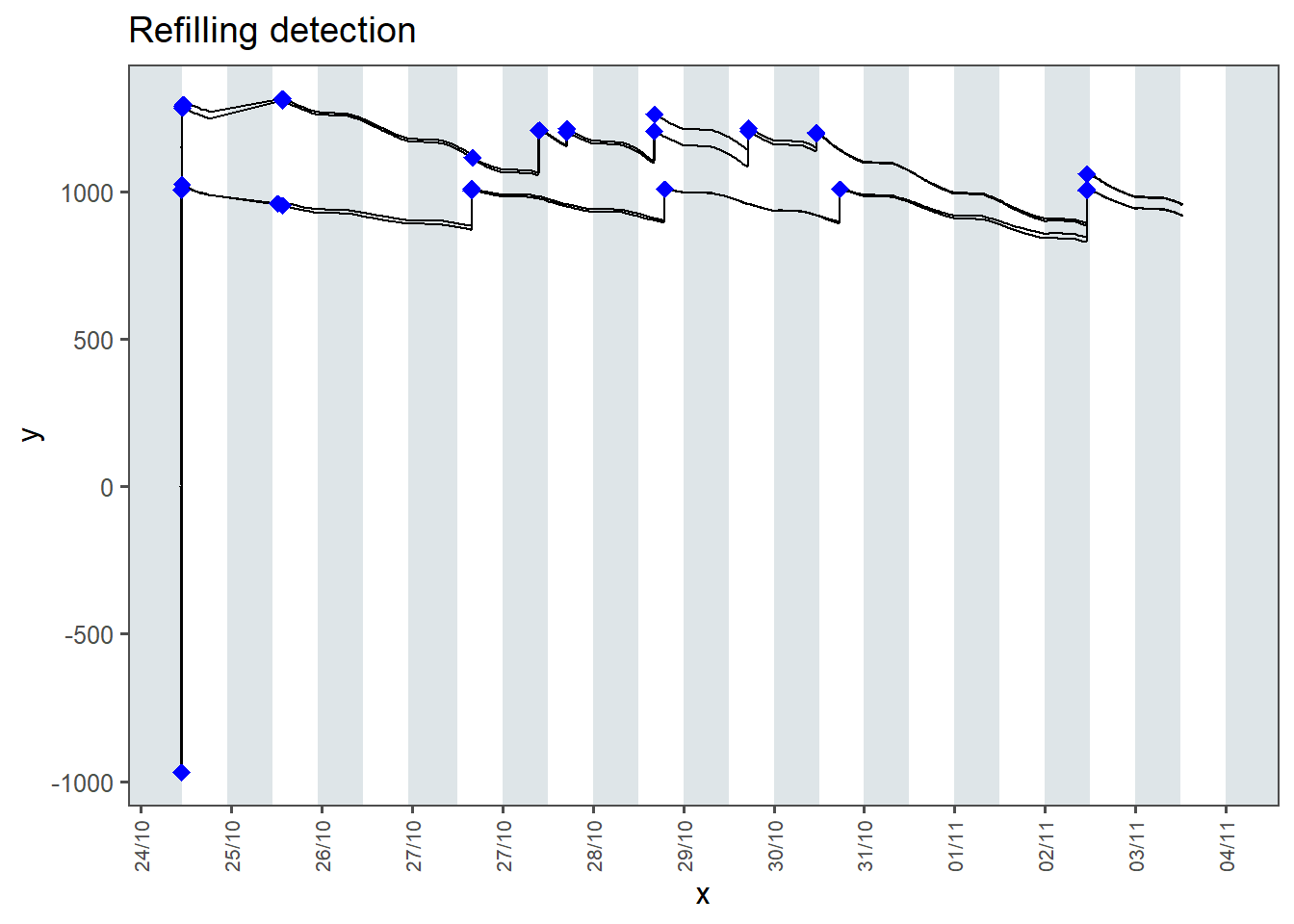
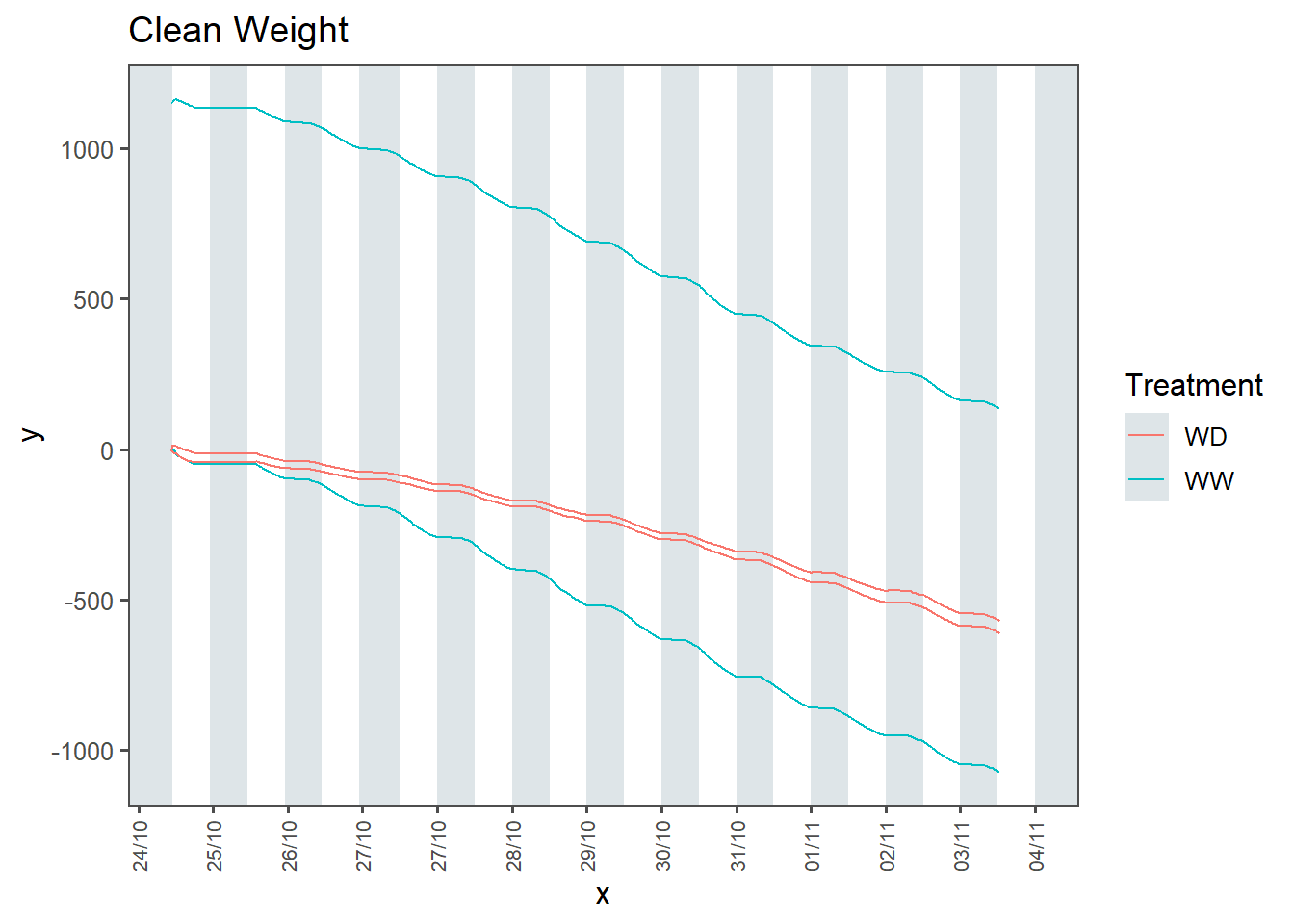
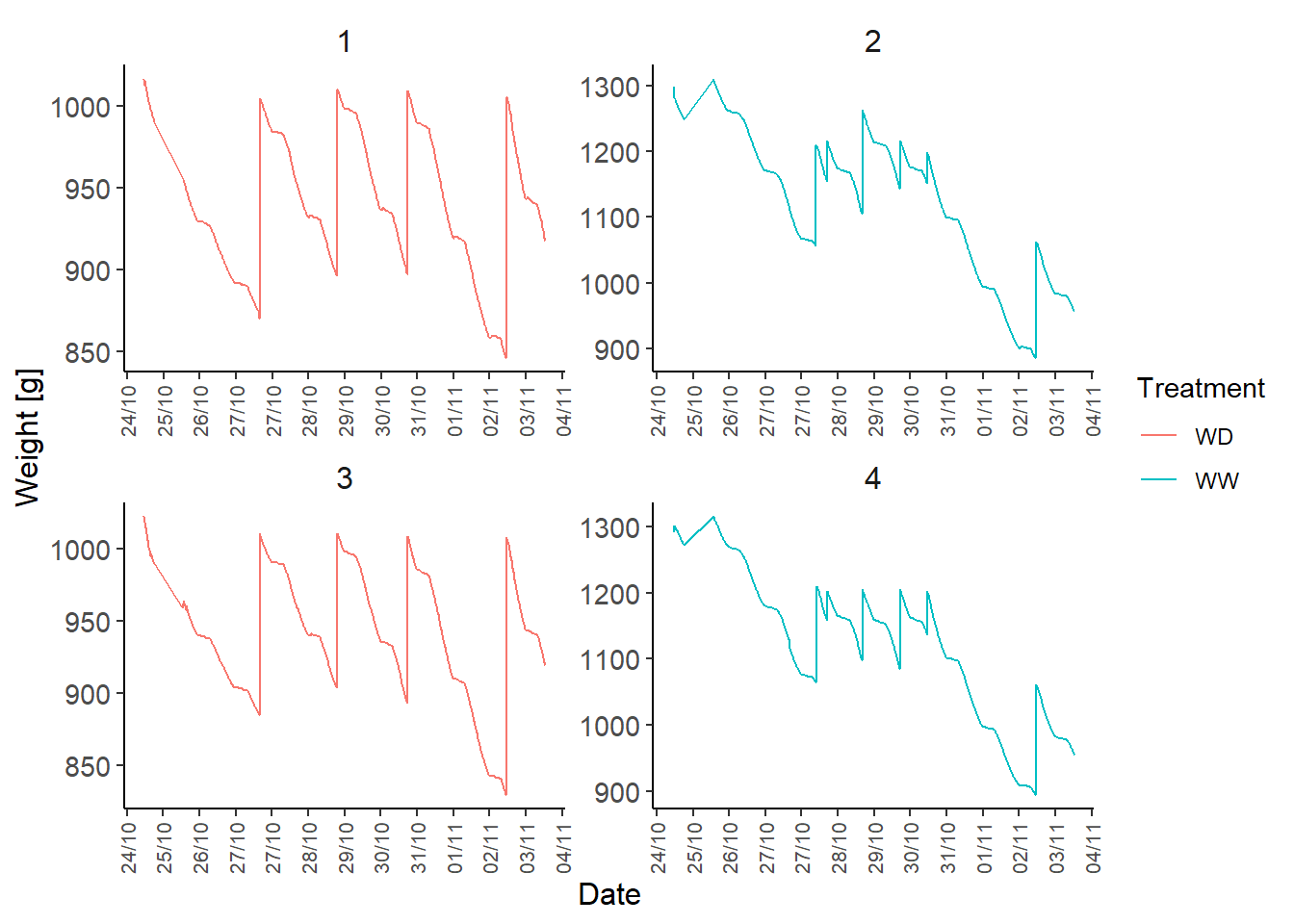
For correction, the function *clean.weight* automatically detect the refilling (that are defined by "jumps" of weight superior of input threshold), then reconnect the data to return only the weight corresponding to plant growth and transpiration.
```{r, message=FALSE, warning=FALSE}
# Load raw file
W_raw <- unique(read.csv(paste0(data_path_raw, "W_raw.csv"))) %>%
  mutate(DateTime = anytime(DateTime)) %>%
  mutate(DateTime = as.POSIXct(DateTime, format = "%Y-%m-%d %H:%M:%S"))

# Cleaning
W_clean <- clean.weight(W_raw, refill_th = 10) %>%
  filter(DateTime >= as.POSIXct("2024-10-24 11:00:00"))
# Write to disk
write.csv(x = W_clean, file = paste0(data_path_clean, "W_clean.csv"), row.names = F)
```
## 4) Compute Transpiration rate
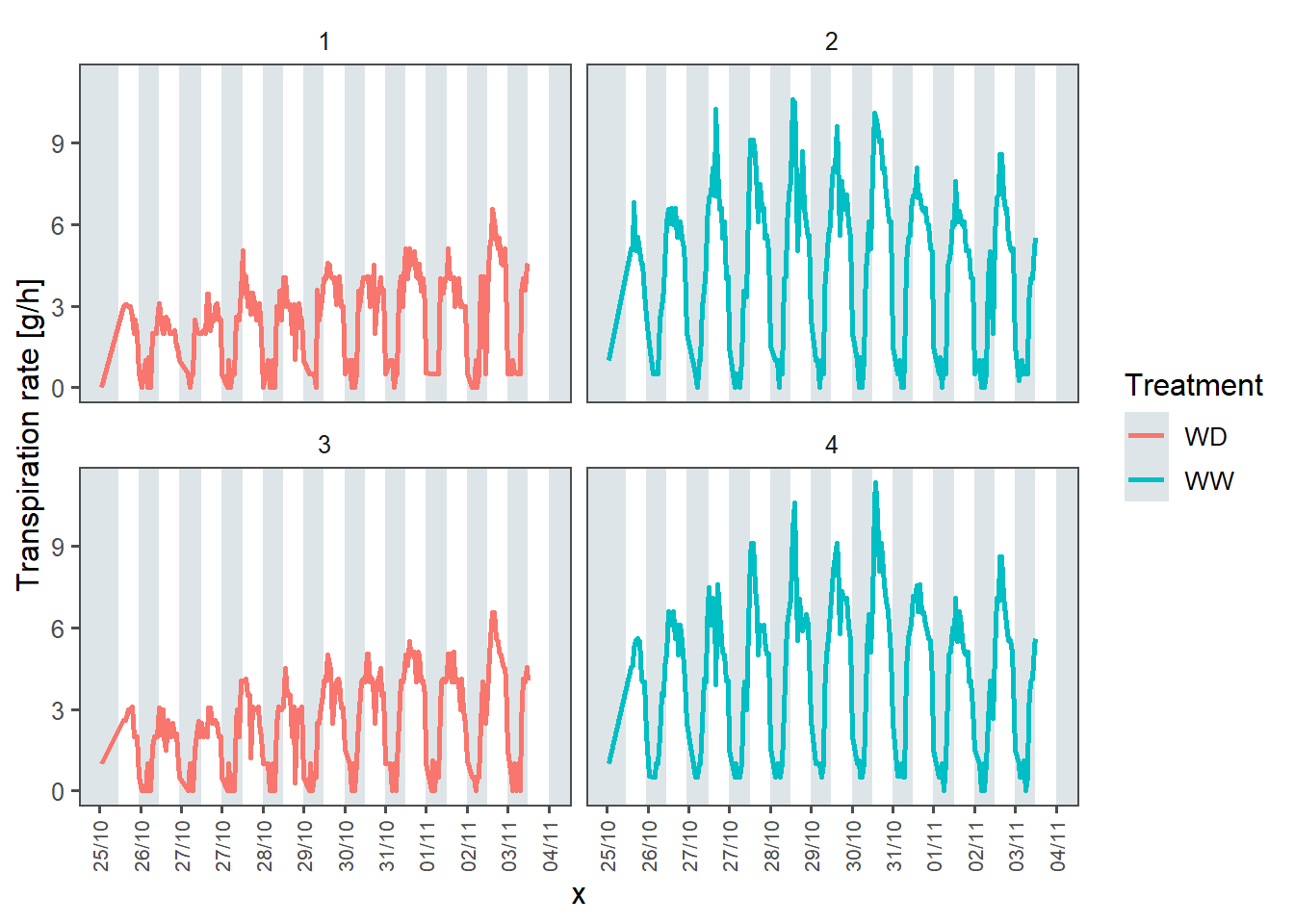
The function `compute_Tr` computes transpiration rate $T_r$ from Weight time series using the formula
$$
T_{r, t} [g \cdot h^{-1}] = (W_{t-1} - W_{t}) / \Delta t
$$
Pre-processed transpiration rate data is stored in `data/raw/` folder.
```{r, message=FALSE, warning=FALSE}
# Load clean Weight file
W_clean <- unique(read.csv(paste0(data_path_clean, "W_clean.csv"))) %>%
  mutate(DateTime = anytime(DateTime)) %>%
  mutate(DateTime = as.POSIXct(DateTime, format = "%Y-%m-%d %H:%M:%S")) %>%
  mutate(Date = as.Date(DateTime),
         Hour = hour(DateTime)
         )

# Compute Tr using custom function
Tr_raw <- compute_Tr(W = W_clean, th = 20, DT.format = "%Y-%m-%d %H:%M:%S")

# Write to disk
write.csv(x = Tr_raw, file = paste0(data_path_raw, "Tr_raw.csv"), row.names = F)
```
### Load Tr raw from file
```{r, message=FALSE, warning=FALSE}
# Read Tr raw fil from folder
Tr_raw <- unique(read.csv(paste0(data_path_raw, "Tr_raw.csv"))) %>%
  mutate(DateTime = anytime(DateTime)) %>%
  mutate(DateTime = as.POSIXct(DateTime, format = "%Y-%m-%d %H:%M:%S")) %>%
  left_join(Plants_ID[c("Plant_ID", "Treatment")]) %>%
  filter(DateTime > "2024-10-25")
```
Simple plot
```{r}
Tr_plot <- plot_timeseries(data = Tr_raw
                           ,x = "DateTime", y = "Tr"
                           ,color = "Treatment"
                           ,show.lines = T
                           ) +
  facet_wrap(~Plant_ID) +
  ylab("Transpiration rate [g/h]")

Tr_plot
ggsave(filename = "Tr_raw.png",
       plot = Tr_plot, device = "png", path = plot_path, width = 9, height = 4)
```
## Make one plot with the 3 variables
Create a gigantic file with every time series measurement.
For that, we create temporary table by gathering variables into one key column (`Measure`) and one value column (`Value`).
Then we bind them by row. For better visualization, we create a new attribute `Plant_name` that combine `Plant_ID` and `Treatment`.
```{r}
LWP_temp <- LWP_clean[c("Plant_ID", "DateTime", "LWP")] %>%
  gather(LWP, key = "Measure", value = "Value")

SWP_temp <- SWP_clean[c("Plant_ID", "DateTime", "SWP")] %>%
  gather(SWP, key = "Measure", value = "Value") %>%
  mutate(Value = Value/1000)

W_temp   <- W_clean[c("Plant_ID", "DateTime", "Weight")] %>%
  gather(Weight, key = "Measure", value = "Value") %>%
  mutate(Value = Value/1500)

T_temp   <- Tr_raw[c("Plant_ID", "DateTime", "Tr")] %>%
  gather(Tr, key = "Measure", value = "Value") %>%
  mutate(Value = Value/10)

TS_full <- rbind(LWP_temp, SWP_temp) %>%
  rbind(T_temp) %>%
  left_join(Plants_ID, by = "Plant_ID") %>%
  mutate(Plant_name = paste0("Plant ", Plant_ID, " | ", Treatment))
```
Generate the plot
```{r}
measures_colors <- c("LWP" = "darkgreen", "SWP" = "orange", "Tr" = "blue")

################################################################################
full_plot <- plot_timeseries(data = TS_full
                             ,x = "DateTime", y = "Value"
                             ,color = "Measure"
                             ) +

  # Show data
  geom_line(aes(x = DateTime, y = Value, color = Measure),
            linewidth = 0.25
            ) +
  geom_point(aes(x = DateTime, y = Value, color = Measure),
             size = 0.5) +

  scale_color_manual(values = measures_colors) +
  facet_wrap(~Plant_name) +

  # Set x limits and define the format of breaks
  scale_x_datetime(# date_breaks = "1 day",
                   date_labels = "%d/%m",
                   name = "Date") +

  # Set y limits and add a secondary axis
  scale_y_continuous(limits = c(-2, 1.5),
                     bquote(expr = psi~"[MPa]"),
                     sec.axis = sec_axis(~.*10, name = bquote(T[act]~"["*gh^-1*"]"))
                     )
################################################################################

full_plot
ggsave(filename = "Full_plot.png", plot = full_plot, device = "png", path = plot_path, width = 7, height = 5)

svg(filename = paste0(plot_path, "Full_plot.svg"), width = 7, height = 5)
full_plot
dev.off()
```